Learning logic with Sherlock Holmes

Yesterday we turned on conditional logic in inklewriter. That's a big load of extra functionality, that lets you write stories that remember what the reader chose and did, and then use that to alter what happens later on in the story.
To demonstrate the functionality - and test it works! - we wrote a short example; a retelling of the opening of The Adventure of the Musgrave Ritual by Sir Arthur Conan Doyle. It's quite a short thing to play-through - have a look - but it uses a surprising amount of logic to keep the text smooth. This post gives a little detail about how it works.
The interactivity
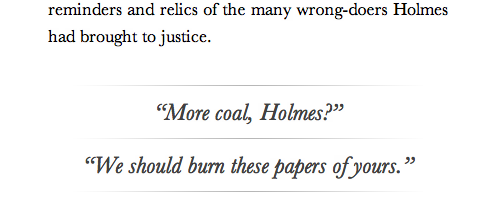
The first decision in writing an interactive story is, how will the interactivity be framed? Is the reader role-playing a character? Is the reader taking an abstract position, co-authoring a story ("Make Ted angry", "Now someone else comes in")? Or is the reader talking directly to a character, over a telephone - or, as Dave Morris did in Frankenstein, something more like the voice in the character's head?
For the Musgrave Ritual, we wanted to stay as close to Conan Doyle as we could, so we kept the Watson narrative point-of-view. So the reader takes on a kind of first-person point of view role, guiding Watson - and more often than not, since Holmes stories are all about Holmes - telling Watson what to say next to his friend.
Keeping the text making sense
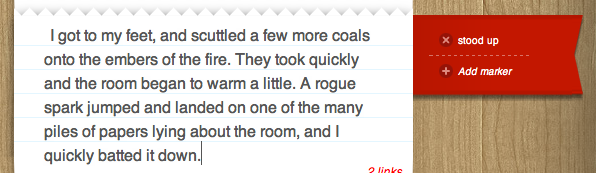
These kind of options can vary simple details, like, does Watson get up to stoke the fire, or is it Holmes who does that? The Musgrave Ritual tracks little details like that, and then uses them later to vary the text appropriately. Here's that example:
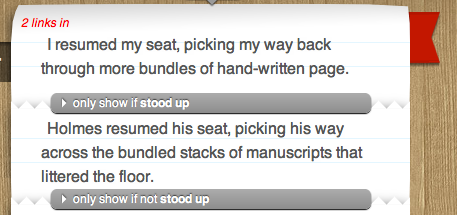
And here's that flag being used to vary the text that is produced:
Tracking mood
Providing choices for how Watson will act lends itself to letting the reader shape that relationship a little bit, just as different actors do in the various adaptations of the stories that are made. Will Watson be a solid, jolly good chap, following Holmes every instruction, as he is classically? Or will Watson be argumentative and almost surly, as Guy Ritchie would have it?
The Musgrave Ritual lets you choose between the two, and keeps track of your choice using a really simple counter, which goes up by one every time you choose a moody option, and goes down when you apologise. (The counter is called "mischevious", to reflect that Watson doesn't really mean it when he gets angry.)

The counter is then tested in order to vary the options the player gets, such as at this point in the story, where only really moody readers will get to insult Holmes outright:
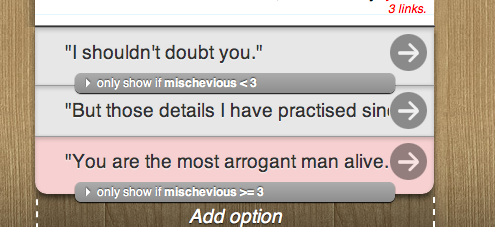
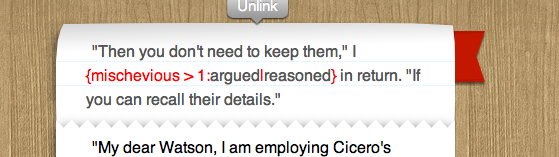
And we also use it to vary the text a little bit, so that surly Watsons will "argue" and "demand", where calmer Watsons will "rejoin" and "ask". Using these "inline conditionals" gives a writer tremendous power to easily colour text with different tones and voices without having to write lots of complex branches.
Loops and unlocking options
The last and most complex use of conditionals appears when Watson decides to examine the objects from Holmes' collection to do with the ritual. This section uses a loop, which unlocks more items the player can examine as they examine some, and eventually offers an "exit condition" that lets them continue the story.
Here's how it's done.
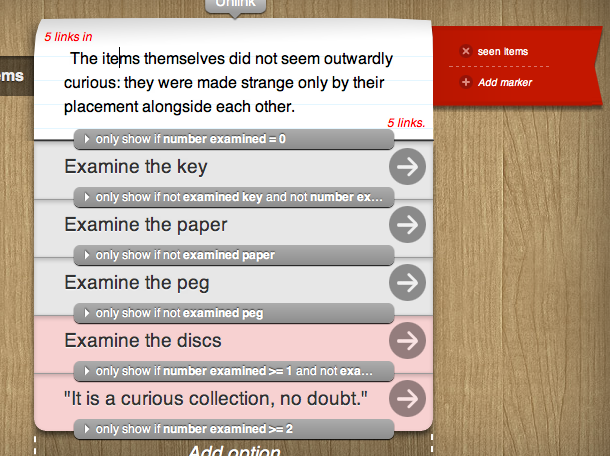
There's one other piece to the puzzle: in each of those options, two markers are used - one to increase the "number examined" counter, and the other to set the particular marker for the item the reader just looked at.
And notice that conditional bar on the text at the start of the loop - that's what stops the player seeing the same text over and over again every time they come back to the same place in the flow!
Other tips
Some other tips from writing a story with lots of branchiness:
- Use sections (that's the widget with the + symbol). Add a new section every time you want to do a new little bit of the story. The system also adds sections automatically for you, but if you don't like the places it chooses, delete them!
- Use the search box at the top of the Contents pane, especially when joining a branch to something you've already written. If you can remember what the text said, then you can find it quickly!
- If you've been jumping around the story a lot you'll find the Contents panel gets quite long. Click the header (the word Contents) and it'll collapse all your sections down to an easy-to-navigate list.
- Test! Play your story from the start, and when you find a problem, flip over to write mode and fix it straight away!
- Be careful when typing in inline conditionals that you spell the name of your marker correctly. This bit's like real programming - you'll have to get the name of your marker or counter correct!
- Have fun and be creative!